scrobble.life
#steemchurch

SteemChurch Telos expansion: SQRL Tutorial for the first 300

Ladies and gentlemen of the SteemChurch,

'Peace be with you'.


This Knight could not be happier! Over 300 have registered to a part of our expansion, with 20-30 registering every day.

SteemChurch is going to change the course of Christian history, as we rise to financial freedom via the blockchain. However, this success will not come without education and hard work. So let us, the first 300, get started.


SQRL

First this Knight would like to take you quickly through the workings of SQRL. The easiest way thus far to transact on the Telos blockchain.

This Knight assumes that most here have been able to access SQRL via a desktop. For those who haven't, the download page is here at Telos Foundation.

https://telosfoundation.io/downloads

Go to Tools / Manage Wallet / Import Account to import a new account. However, you probably imported your new .jc account when you set up the wallet.

Staking TLOS

Like in Steem, you can stake (Steem Power) and unstake (Liquid Steem), however instead of a 13 week unstake period Telos is just 3 Days.

At the moment your account is running on a resource delegation from jc, being the CPU and Net. We also purchased 10kb of RAM for you. These resources will allow you transact on Telos. However, it will not let you engage in governance. To do this you must first stake your own TLOS CPU and NET. So let's try this.

Go to your Wallet and unlock.

Hit Update Staked TLOS

Enter 0.5 NET and 0.5 CPU and hit 'Update Staked Balances'.

TERRIFIC! You have now staked 1 TLOS total and you are now you are able to participate in Block Producer and Worker Proposal elections.

Appoint a Voting Proxy - FreedomQuest.

Now that you are able to participate in Telos governance, let's start by appointing the SteemChurch Proxy Representative. You can of course vote for BPs yourself or another proxy, however this Knight likes to believe we will all stick together.

So - go to Governance, then Proxies...

Scroll down until you come to the 'FreedomQuest' Proxy - representing Christian Values on the blockchain.

Click on circle next to the proxy name and then hit 'Confirm'.

Congratulations you have now appointed a voting proxy.

If you get really keen you may want to take a look at the Workers Proposals and Arbitrator Elections on the neighbouring tabs.

Acorns.

No doubt you want to start accumulating Acorns - so let's do this.

First you need to add the Acorn token to your wallet, if you have not done so already.

Go to Tools / Airdrops Custom Tokens

Hit 'Add Custom Token'.
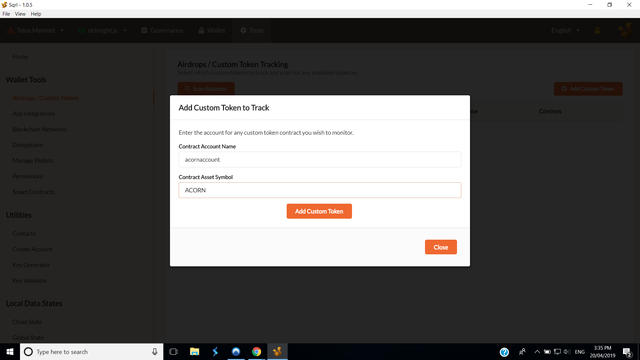
The contract name is 'acornaccount'. The asset name is 'ACORN'.

Hit add custom token and Confirm Custom Token then go back to your wallet. You should now see your 0.1 Acorn.

You are earning 1 acorn per day, however you need to first give, in order to receive.

So let's send 0.01 acorn to acornwell.jc - this is the SteemChurch wishing well.

Hit 'Send Tokens.'

Recipient is 'acornwell.jc'.

Token selection is 'ACORN'. Amount is 0.01.

Memo - make a wish.

Then confirm.

Depending on how old your account is, you should have just received a few acorns into your wallet.


Well done!

This is it for now ladies and gentlemen. This is your first few steps into the most advanced blockchain on the planet.

This Knight knows that soon, some of you will be designing your own Smart Contracts on Telos and the SteemChurch will be supporting you all the way.

In the meantime, go back to your Welcome Letter and visit the links provided. These will assist in growing your knowledge of this amazing new platform.

Be well, God bless and Happy Easter.

SirKnight.

P.S. Sorry about all the typos in the first draft posted. The squires are all hanging round the castle these holidays.

Comments · 18

  • @fredkese(72)· 2691d

    Done with mine finally

  • @fredkese(72)· 2692d

    @steemchurch @sc-telos and @sirknight, can you have a tutorial on using scatter? Would appreciate that one too. Thanks in advance.

  • @gniksivart(69)· 2693d

    @sirknight where do I get my private key? I thought I completed the sign up, but could be wrong.

  • @steemitboard(66)· 2693d

    Congratulations @sirknight! You have completed the following achievement on the Steem blockchain and have been rewarded with new badge(s) :

    You got more than 3500 replies. Your next target is to reach 3750 replies.

    You can view your badges on your Steem Board and compare to others on the Steem Ranking If you no longer want to receive notifications, reply to this comment with the word STOP

    Vote for @Steemitboard as a witness to get one more award and increased upvotes!
  • @rubenmedina182(63)· 2693d

    Excellent tutorial SK, many will be more clear about the wallets and sqrl functionalities.

  • @sc-telos(57)· 2694d

    In good time, we are already on the right track to follow. Thanks SK

  • @fatherfaith(71)· 2695d

    You have done a good job with this tutorial. Well explain You are such a wonderful man SK. Thank you for carrying us all along

  • @ebv22(48)· 2695d

    Good information @sirknight, thanks

  • @carolina17(65)· 2696d

    Good guide SIRKNIGHT

  • @steemchurch(69)· 2696d

    Excellent tutorial SK, the objectives are being achieved. Let your success keep making noise.

    EC

  • @evegrace(70)· 2696d

    Thanks @Sirknight for the guide.. Meanwhile, I complained that I lost my e-mail password, what do I do? can I send an alternate mail so I can receive my account creation details

    My Telos username was Evegrace.jc

    Please help!

    Thanks.

  • @oppongk(69)· 2696d

    Great tutorials, well explained!, thank you legendary SirKnight for your love for us all.

  • @abidemiademok21(58)· 2696d

    Thank you so much for sharing this. I personally did not know all this but I am going to try it.

    Posted using Partiko Android

  • @liltom002(59)· 2696d

    Thank you SK for the tutorial. I really needed it!

  • @uyobong(78)· 2696d

    Great SN,

    This Priest is glad to glean a lot from your tutorial. I just followed the instruction and the results are amazing.

    SO far, I've accumulated 50TLOS and 16 ACRON.

    With this, I can comfortably instruct my people and guide them to this great land of prosperity.

    Here is my wish:

    Wishing for the emancipation of Christians from the grip of poverty and setting Youths aflame with Spiritual and financial affluence.

    God bless you @Sirknight.

    Below are screenshots. I will be doing a follow-up tutorial soonest.

    Wishing for the emancipation of Christians from the grip of poverty and setting Youths aflame with Spiritual and financial affluence

    Happy Easter!

    I am @Uyobong Priest of @Steemchurch

  • @ammyluv(60)· 2696d

    Wow! Over 300 registered? There is nothing we cannot achieve in unity. Kudos to @Sirknight & all Parishioners.

    Very informative @Sirknight! You also made it as easy as it can be for better understanding.

  • @maxdevalue(69)· 2696d

    Lovely tutorial, I’ve been longing to have these processes explained out, thanks @sirknight for taking your time in explaining all these.

    Posted using Partiko iOS

  • @partiko(66)· 2696d

    Thank you so much for participating in the Partiko Delegation Plan Round 1! We really appreciate your support! As part of the delegation benefits, we just gave you a 3.38% upvote! Together, let’s change the world!